
Handy-dandy European travel tips

Some planning can help bridge the gap when traveling across the Pond.

Since I’ve just returned from a meticulously planned and busy but fabulous trip to England and Paris, I am feeling magnanimous, so I am going to share a few of the things I learned while traveling there this time around. Those of you who might be traveling that direction for the first or second time might find some of what I picked up useful. Those who have done more traveling might find this simplistic, or it may still be helpful in some ways. Either way, have fun!

  1. Get the right outlet converter. outlet adapterYou may know, as I did years ago when I first traveled to Paris, that electrical outlets/plugs are different there than they are here in the States. We use two- or three-pronged 110-volt outlets and cords, and the Europeans use 220-volt outlets. So when I went on that first trip 9 years ago to Paris, I picked up a voltage converter at Radio Shack. Worked just great. Back then it allowed me to charge my laptop quite easily. Well, here’s the kicker: England is, once again, different than the Continent and different from here. Just as those wacky Brits drive on the left side of the road, opposite of the States and the rest of Europe, they also use a different plug. I thought that I was all prepared for all of our trip using the old voltage converter, but no. England uses a big three-pronged plug that’s different than what we use here in the U.S. and different than the tiny two-pronged plugs in France and Italy, for instance. Next time we go, I will make sure I have a converter that works for each place we visit. (We happened to get lucky, however, in our nice hotel in London: that blessed place had a whole variety of outlets behind the desk in the room, including an American-style outlet, so I was able to charge all of my gadgets. Yay for the Rembrandt!) Also remember that even if you do get the right converter, if it only has a two-pronged “in” for your gadgets, you might be out of luck with your three-pronged grounded items. I found this to be true when I got to Paris. Yes, my old converter worked, but it was only two-pronged, and my newer netbook has a three-pronged plug, so I wasn’t able to charge it anymore once we left our posh London hotel and got to our less-nice Paris digs.
  2. Prepare your credit card. Here in the States, we swipe magnetic strips on our credit cards and then sign for them. In England and Europe, they have moved on from swiping to using chip-and-PIN cards. A special chip is embedded in the middle of the card, and you must use a PIN to be able to use the card once the card is inserted in the card reader. If you want to be able to charge purchases on your trip, call your credit card issuer and request a chip-and-PIN card. Otherwise, I don’t think it’s possible to use the old swiping-style there anymore. And you’ll be up a creek. Also, when you call your company, let them know that you’ll be traveling, where and when, so your card won’t trigger fraud alerts or not be authorized. That should smooth the way for your travels and ease your mind so even if you plan to use mostly cash, you can still use that credit card in a pinch.
  3. For clothes, pack in layers. Weather could easily be very different from your home town, so be sure to check the weather. Even then, pack light jackets and prepare with layers. I took short-sleeved shirts and tanks and then layered with short-sleeve and long-sleeve light sweaters and jersey “cardigans.” I kept the long-sleeved cardigans in my carry-on and could swap out with the short-sleeved if necessary.
  4. For heaven’s sake, make sure your passport is up to date. Passports are issued for 10 years. But if you’ve had one for a while, make sure it hasn’t expired. Otherwise, you have about 4 to 6 weeks to get a new one. If you’ve never gotten one before, apply in person. Most likely, your local Post Office has a spot for doing that. If you need to renew, all you have to do is send in the proper paperwork along with the old passport through the mail. For more details, go to the State Department’s website.
  5. To make things a little easier, get a feel for local currency before you travel. I knew what the exchange rate was for dollars to pounds before we traveled, so that was helpful in judging how much things were “really” costing me in dollars when I made purchases. But when I pulled out my cash, I was embarrassed at how long it took me to pick out the right coins for the job. One time, a cashier just picked out the coins from my hand. I’m guessing he was being honest. 🙂 After a week in England, I still felt a little shaky over the sizes of the coins. It might have made things easier if I’d taken the time to acquaint myself with the coins before I left. Not crucial, but nice, and a little less embarrassing.
  6. Make sure your suitcase(s) and carry-on(s) are easy to carry/wheel around. If you’re anything like us, you’ll end up on a lot of trains and/or taxis and subway cars, and having a suitcase and carry-on that are in good condition and wheel comfortably, etc. will be a godsend. my suitcaseI did some shopping a few months before the trip on Overstock for a new suitcase that would be a few steps up from the cheap set I bought at K-mart years ago, and I’m so glad I did that. One, my new suitcase and matching tote had very bright, multicolored stripes, making them easy to spot on the luggage carousels and easy to spot when my husband was taking a turn wheeling one around. I always knew where he and the luggage were. More importantly, the newer and nicer case had a much higher quality set of wheels and telescoping handle, making it easier and lighter to wheel around. We took those suitcases everywhere and on all kinds of transportation and in between, on planes, trains, taxis, ferry, underground, metro, and on lots of sidewalks in between. I’m SO glad I spent an extra hundred bucks on the nice case. Take a look at mine: (but don’t buy the same exact one, people. We’re trying to stand out here, right?)

  7. I highly recommend making a day-to-day detailed itinerary for yourself of where you’re going, when, and how. I printed up about 10 pages of fairly detailed instructions for myself for every stage of the journey. Since we did so much traveling from town to town via lots of modes of transportation, it was SO helpful. First page was my first flight, then my second flight, then the arrival time and the train we were supposed to take to the next destination. Then I had the hotel information for our first night, then the transportation info for the second day’s travel to the next stop. I just checked off where we were/what we’d done and flipped the page. It really made the journey a lot easier to look to that main itinerary.

Above all, my last “tip” is simply to relax and enjoy yourself. No matter how much time you allot yourself, you won’t possibly see everything there is to see or everything you’d like to see. Just pick a few highlights that are most important, and give yourself plenty of time to enjoy them. And if you get worn out and have to take a nap at the hotel, don’t beat yourself up that you’re not seeing more sights. Just remember, IT’S YOUR VACATION. You’re meant to be having fun, relaxing, and enjoying yourself. If you have to take pit stops to rest and regroup, then do it and don’t feel guilty. Now go out there and have a great time.

Electronics, little hands and church services

While this topic may potentially offend some people or make me seem like a zealot or a super-strict mom or any number of other things, I think I’d still like to approach it because I think in our world of ever-dominant electronics devices, it’s a good idea to take a step back and think carefully about how we use them, where, and when.

This weekend we had a large gathering at church, one we do about twice a year, where all the members of our church in our area came together to listen to inspirational messages. As with most of our weekly meetings, the Sunday-morning meeting included adults and all ages of young people: babies, toddlers, teens and all in between. With a gathering this large, I had occasion to glance around me during the meeting to see how the young people were occupying themselves. Two- and three-year-olds were invariably snacking on Cheerios or other bite-size goodies or looking through quiet books; six- or eight-year-olds were either sitting mostly quietly or sometimes looking at books or drawing. Teens were listening to the speakers or sometimes supervising younger siblings. And in the hands of kids of any age I saw quite a few smart phones. Little kids were playing simple games; teens might be doing the same or texting. No matter the age, bright little screens were being employed in every row.

This is for illustration purposes only; the second I was done taking the photo, she had to give up the game. (ha!)

I had a few reasons for feeling dismayed at this sight. But first, I will explain my expectations, having four daughters myself. I definitely do not expect toddlers to sit still and do nothing but listen during any kind of church meeting. Three- and four-year-olds can often sit mostly still, however, and occupy themselves with books or coloring. And any kid older than eight is usually capable of sitting still and listening to speakers without needing distractions or toys. No, they won’t necessarily get a LOT out of the meeting, but they can pick up bits and pieces of truths that are imparted over the pulpit, and they can practice sitting still and being patient during a time they may still at that age consider to be “boring.” After all, they are at the age of eight already in school and heading toward a stage where they will frequently be sitting and listening to teachers “lecture,” at least for an hour at a time.

I can also make clear that I’m not a big fan of electronics for kids. Period. I do love gadgets (see my kitchen gadgets post and my ode to my Kindle), so I’m by no means a Luddite. I think that we have some amazing technology, and it’s very helpful in its way, at the proper places and times. But I also believe that children still need fairly limited times interacting with any kind of screens, be they TVs or computers or portable devices. Young children need time to be free and have opportunities to create and imagine and use their own minds to keep busy. It’s vital for their healthy development. Giving them a gadget of some type to stay busy with just trains them to turn to electronics whenever they’re bored. I try to limit the time my kids spend watching TV or movies or using the computer or playing on the Wii or Xbox, and they don’t get to play with my iPod Touch.

Now back to the church setting. It dismays me a bit to see iPhones or other little games in the hands of small children because it’s training them to turn to electronics rather than draw or create or read. But it doesn’t bother me a great deal because I respect that for some parents, it’s one of the tools in their arsenals to keep those little ones quiet and busy during a church meeting. Even though I haven’t chosen to have my little ones play on electronics devices, I appreciate it is useful for some other parents.

What bothers me the most is seeing teens or tweens using these gadgets at church. Kids of these ages are perfectly capable of sitting still and listening and getting something from a religious service, and allowing them to distract themselves via video games or texting or surfing the Web is depriving them of the opportunities to learn patience, sit still for an hour, and experience the peace and soul-satisfying feelings of religious worship. Some people out there may not consider faith or organized religion to be important, so they can probably just disregard this whole post. But for those parents who value the role of religion in their lives and the lives of their children, I say, make sure your children aren’t distracted so they can actually feel the good feelings that come from being in a religious meeting. I personally think it’s absolutely crucial that my daughters learn to feel the Holy Spirit, and understand how it can guide them in their lives. I want them to know that God and Jesus Christ are there and that they know them and want to help. Our family devotions of reading scripture and praying are part of that process of helping them to know those things and to turn to God for help. Church services are another piece of that important puzzle. I wouldn’t dare to distract them when they have the opportunity to experience peace and the Holy Ghost at church, and electronics are an easy distraction.

I don’t want to be judgmental, but at the same time, I wonder how many parents have given serious thought to how much  electronics can take away from valuable experiences that require quiet and contemplation. Computers and the Internet and games and all of those things can be real sources of distraction, and it’s not a minor issue. I thoroughly enjoyed an article by David A. Bednar called “Things As They Really Are,” which addressed the issue of “cyberspace” interactions and experiences. In it, he said, “Sadly, some young men and young women in the church today ignore ‘things as they really are’ and neglect eternal relationships for digital distractions, diversions, and detours that have no lasting value. … A young man or woman may waste countless hours, postpone or forfeit vocational or academic achievement, and ultimately sacrifice cherished human relationships because of mind- and spirit-numbing video and online games.” And I think those last words are revealing: these devices are numbing. They do not challenge us or encourage us to grow in any way; they simply numb us and prevent us from feeling or thinking too much at all. And why do we attend church? To grow, to ponder, to commune with the divine. We go to be inspired. How can we do that when our minds and spirits are being numbed by electronics? Bednar went on to say: “Please be careful of becoming so immersed and engrossed in pixels, texting, earbuds, twittering, online social networking, and potentially addictive uses of media and the Internet that you fail to recognize the importance of your physical body and miss the richness of person-to-person communication. Beware of digital displays and data in many forms of computer-mediated interaction that can displace the full range of physical capacity and experience.”

As parents, let’s not get enmeshed ourselves in these potentially destructive uses of technology, which can really be a great blessing in so many ways. And let’s not allow and encourage our children, who are in such tender, formative stages of development, to be distracted and numbed, especially when they are in a sacred place like church, when they could be feeling the best of feelings and influences. Let’s think more carefully about how we use our electronics, when, and where.

Many thanks to my kitchen doodads

Since I wrote about my Kindle earlier this week, I thought I should follow up with an ode to the other gadgets that get me through each day. I do a few things often and well: I read, I write and edit, and I cook and bake. That leaves me either sitting on a couch or reclining in bed (reading), sweating on an elliptical machine (reading), sitting at the computer (writing and editing), or standing in the kitchen (cooking, cooking, cooking and baking). Add in running errands, shopping, picking up kids and sleeping, and that covers a good deal of my life.

I cook most meals for my family. I like to bake muffins for breakfast or throw some pancakes on the griddle; I usually make up some quesadillas, hot dogs or sandwiches for lunches, and for dinner… well, the possibilities are endless. Thanks to my fairly recently added account on Pinterest, I’ve added on all kinds of new items for dinners. And while still on the topic of my Kindle, it has made it really easy to just take my Pinterest recipes straight in to the kitchen for test purposes, without even having to print anything out. (I always wanted all my recipes in some kind of easily accessible electronic format, and while this isn’t quite that, the Kindle has moved me a step closer to it.)

For dinners, almost any cuisine makes its way to my kitchen. I’m very lucky that my girls are all pretty good about eating almost anything I make (exceptions: none of them like scallops, the youngest doesn’t particularly like asparagus, and they don’t like any kind of ethnic fare to be too spicy), so they have eaten Thai-inspired cuisine, Mexican, Chinese, Japanese, Indian,  Filipino… you name it. Much of what I make involves a fair amount of prep work, mostly chopping and slicing of vegetables. (We go through a lot of onions and garlic, and during the winter — soup and stew season — a lot of carrots and celery too.) I bake bread loaves and make all kinds of bread products, whether they be “quick” or yeast-based.

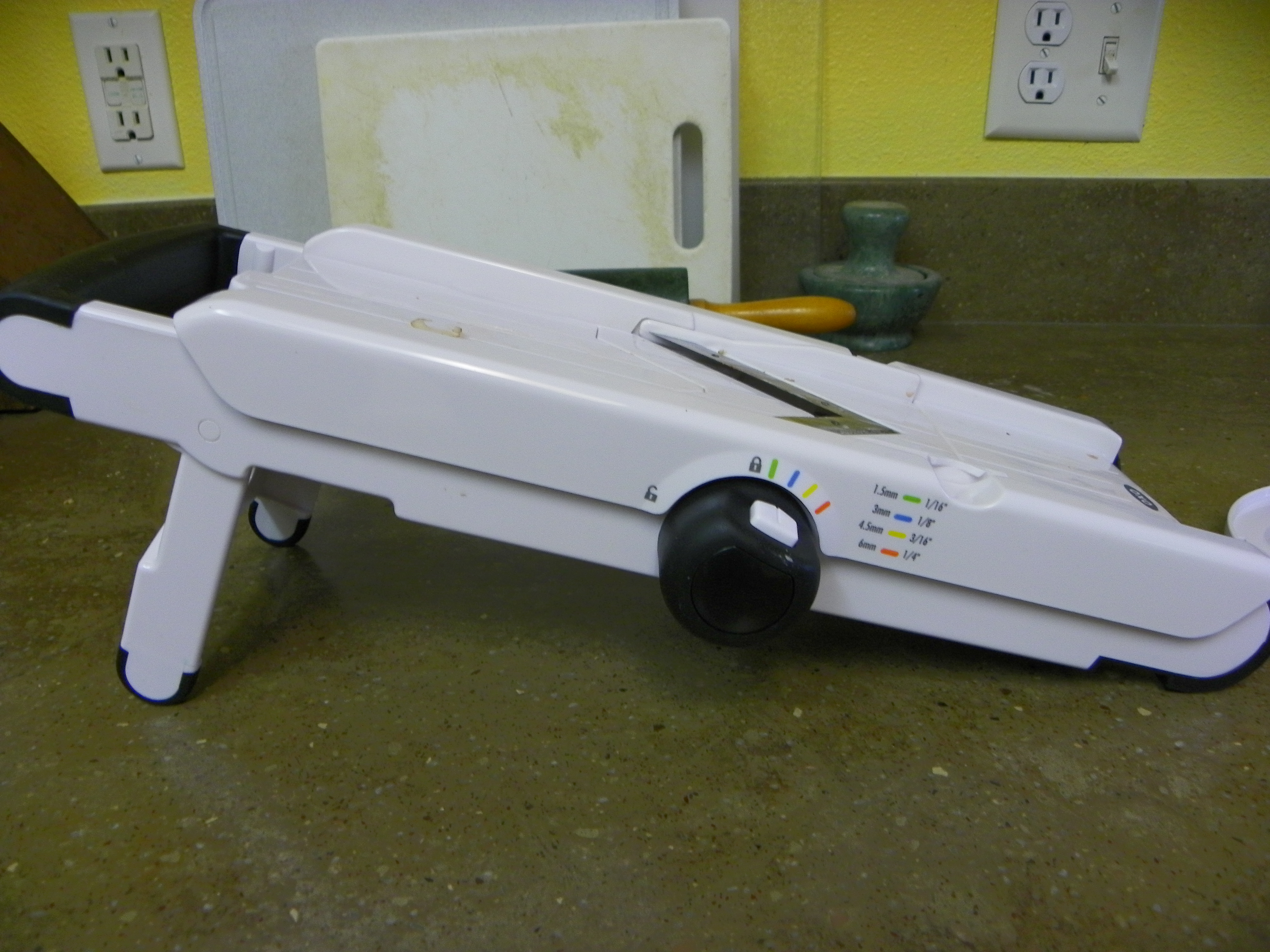
Without the proper tools, the prep work involved in every night’s meals could be overwhelming, potentially leading me to just stop cooking and resort to fast food or mostly prepared food from the supermarket. Since I don’t like those options for the basic reasons of expense and health, I have stocked up on gadgets to make my work easier over the years. This week, for instance, my husband has two occasions to shop for me: Mother’s Day and birthday. I’ve made it a little simpler for him over time by requesting kitchen doodads for gifts. My most recent acquisition was my mandoline (Valentine’s Day: isn’t it romantic?). Sure, I have choppers, and a Cuisinart food processor, but none could slice potatoes or other vegetables nice and thin. So it was time to get a good mandoline.

I did a little looking around at reviews other buyers wrote about mandolines, looking first at Williams-Sonoma, and found that a simple Oxo $40 model was preferred by many of them. That’s amazingly what my husband brought home for me from Bed, Bath and Beyond.

I use it primarily for potatoes. It’s perfect for making gratins and just perfectly thin-sliced potatoes for frying on the stovetop. It’s also great for cutting french fries. In my three months of owning it, that’s been my big use, but I’ve also used it for slicing up a bunch of vegetables for a salad. It supposedly juliennes, but I haven’t had the success I’d like to see in julienning carrots. But most of the time, I don’t do much julienning, just shredding, which leads me to …

My Cuisinart.

I didn’t get this until just a couple of years ago. The main reason for that is I was able to find a very nice mini processor 15 years earlier for only $20 that fit my budget much better than the Cuisinart. That mini processor shredded and chopped pretty nicely, and I was very happy with it. Unfortunately, it finally bit the dust and I went out in search of a replacement. I found this Black & Decker, which had not just the chopping capability (most of the mini processors I found were merely mini choppers) but also shredding capacity. But when I got it home, I found that the shredding setup was lousy and it never worked right.

So I don’t recommend this one. In fact, right now I can’t recommend a particular mini processor that both chops and shreds. I just miss the old one that died after a pretty decent life span of 15 years (which is an eternity in this day and age of electronics). At any rate, I kept it because I think I couldn’t find the box or receipt or something. And it does work very nicely for quick chopping of items like nuts, onions, garlic and celery. In fact, I think it’s much more effective than my big Cuisinart.

So since the mini chopper didn’t work for shredding, and sometimes I just really need to shred large quantities of carrots or cheese, I got the Cuisinart. I’ve enjoyed it quite a bit for those uses, and it’s been nice to finally have a full-size food processor that can puree/blend. It’s been great for a number of uses I just had to do by hand or figure out how to do with some other gadget before I had it. Note: don’t try to chop in the Cuisinart. It simply doesn’t work. When I first got it, I made a nice Mexican layer dip with beans and guacamole and salsa, and I tried to “chop” my garlic and onion in there for the guacamole. What I got was pureed onion, not chopped. And it was far too much for the avocado to handle. It was like onion dip instead of avocado dip. Nasty. But I’ve made some recipes that are based on quinoa or beans instead of wheat (for gluten-free friends or just for a kick), and pureeing the beans or cooked quinoa in there, along with the other items in the recipe, has worked fantastically. It’s made for that. I’ve also used it to puree the plums from our tree to make jam. Perfect.

I also had a little non-electric chopper I use kind of alternately with the electric mini processor. This one’s an Oxo; before I had a model from Pampered Chef. Both work fine. The PC one just broke after a while, and this one, while still working after a couple years, won’t adjust to lock so I can clean it more easily anymore. So it’s a pain to wash.

It is very effective on the same kinds of things: onion, celery, garlic, nuts. Main difference is how it’s set up and that it uses hand power (if you’re feeling aggressive or annoyed, just bang on that a few times and you’ll have gotten out your anger AND chopped your food very finely). It also allows you to chop right on a cutting board rather than having to pick up the items and put them inside of a machine’s bowl.

Now, the workhorse of my kitchen counter is my Kitchen Aid stand mixer.

I was very fortunate to get this one for only about $140. I got a basic model at Wal-Mart, and my mom worked there at the time, and at Christmas she would get 20% off one item. She let me use that discount to buy this, so after its initial reasonable price and the discount, I was only out $140. But it’s definitely worth $200. I use this every day. Before I had this, I thought I’d always be content with a hand mixer, but then one day I tried an amazing recipe for a decadent chocolate cake I found in the Oprah magazine. The buttercream filling requires beating for 10 minutes, and drizzling a sugar syrup into the filling while it’s being beaten. It’s very tiring with a hand mixer. That was kind of the last selling point for me to get that Kitchen Aid, and I’ve loved it ever since. I use it for cookies, cakes, and doughs. It’s very handy for making pizza dough. The recipe I use requires kneading for 5 or 10 minutes, so I just get it going and let it knead while doing other stuff. (I will say that I never use this for my homemade bread. It just needs real hands working it hard. But this is one of the few things I do knead by hand still.)

You can probably tell just how fond I am of these gadgets. And I have more … I just won’t go into detail about every last one of them. (The ice cream makers probably deserve a post of their own.) In this age of busy-ness, and the stage of my life in which I have four children at home, who are off to different places and activities, and in which I have all kinds of projects of my own on top of that, having these amazing time-savers is wonderful. It means a lot to me to serve healthy, yummy, homemade meals to my family, and these electronic helpers are my little kitchen elves.